
Free academy management software with no cap on students
Membrix's free plan has no student limit and no credit card to sign up. It covers the basics of running an academy: students, billing, classes and attendance. This page lists what you get, what waits for Pro and what neither plan does.
Free plan with unlimited students. No credit card to start.
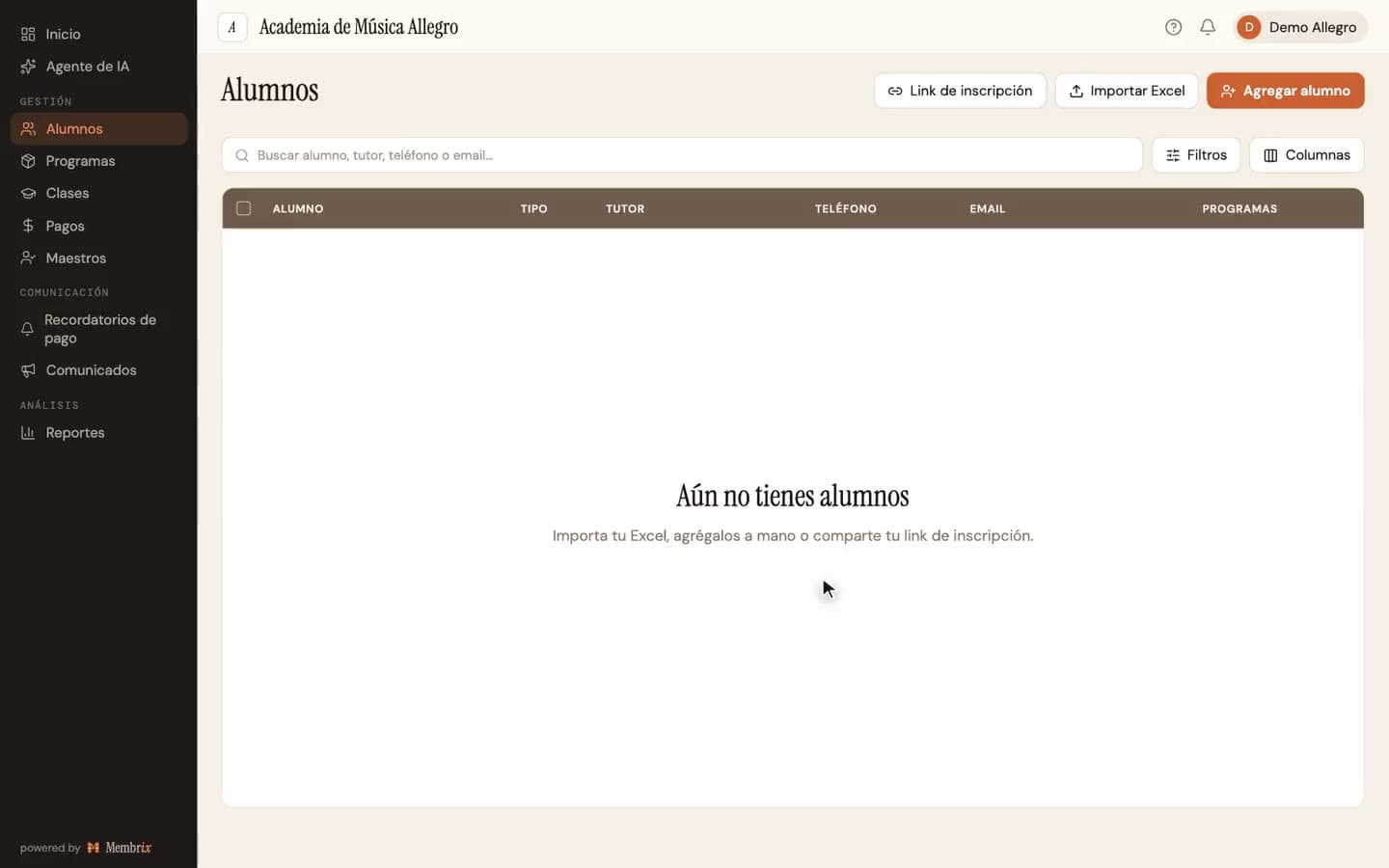
Membrix's app and dashboard are currently available in Spanish.
“Free” usually comes with fine print you find in month two
Plenty of free tiers stop at a number of students or lock the one feature you signed up for. Here is exactly where this one stops.
- The limit isn't the number of students. It is unlimited, for as long as you keep the account.
- The limit is automation: reminders, the mobile app, announcements and reports are what Pro adds.
- The registration link is free, but only the first 3 new sign-ups each month go through before the rest wait.
- Nothing about the free plan expires. It isn't a trial.
How it works in Membrix, step by step
What you see here is what the product does today.
- 1
Create your account
Sign up with your email. There is no credit card and no sales call. The setup guides you through your academy's name, type, and the currency you charge in, which can be US dollars.
- 2
Add your students
Import a spreadsheet or add students one by one. The directory holds contact details and notes, plus custom fields of your own, and you can filter by any field that's a list of options.
- 3
Define how each program bills
A program can be monthly, a fixed-length course, a one-time charge or a pack of classes with an expiration. Each has its own amount, billing day, one-time charges when someone enrolls, late fees and discounts.
- 4
Set up classes and take attendance
Build your calendar with rooms, capacity and teachers per day, and mark attendance in each session. Teachers and students sign in to free web portals.
- 5
Record what people pay
Record payments as they arrive, in cash, by transfer or by card, and see at a glance who has paid, who owes and who is overdue. One payment can cover several students.
What each plan includes
You can start free and add Pro later, or try Pro for seven days first.
Free
$0
- Unlimited students, with a full directory and custom fields
- Programs and billing: monthly, fixed-length course, one-time or class package
- Payment tracking with balances, late fees, discounts and one-off charges
- Classes, calendar, capacity and attendance with four states
- Web portals for teachers and students
- Registration link and QR code (3 new sign-ups a month go straight through)
Pro
$49/moper location, billed monthly
- Automatic payment reminders and manual sends
- Mobile app for admins, teachers and students, with announcements
- Reports with Excel export, expense tracking and inventory
- QR check-in kiosk, class bookings and student progress records
- AI assistant chat and more recommendations (it answers in Spanish), and additional administrators
Pro billed yearly: $41/mo per location ($499 a year). 7-day free trial.
What Membrix doesn't do here
So you don't find out after you sign up.
- The app and dashboard are in Spanish. There is no English interface yet.
- The free plan has no automatic reminders. You can still see who owes on the Payments page and message people yourself.
- The payment method list is fixed: cash, transfer, debit card and credit card. There is no separate label for checks or apps like Zelle or Venmo.
- Card payments inside Membrix and automatic charges exist only for academies in Mexico that bill in Mexican pesos.
- Membrix doesn't do payroll and doesn't replace an accountant.
Frequently asked questions
Is the free plan really unlimited?
+
Yes, for students. There is no cap on how many students, classes or payments you can record. What the free plan doesn't include is the automation that comes with Pro, such as reminders, the mobile app and reports.
Do I need a credit card to start?
+
No. You create an account and start. A card is only requested if you choose to try Pro, which comes with a seven-day trial you can cancel before it charges anything.
Can my teachers and students use it on the free plan?
+
Yes, through the web. Teachers get a portal where they see their own classes and mark attendance. Students get a portal with their account and payment history. The mobile app for both, and the app-only extras, are part of Pro.
Can I charge my students in US dollars?
+
You can set your academy's currency to US dollars, and every amount in Membrix then shows in dollars. Membrix doesn't convert anything: it labels the amounts you enter. Card payments through Membrix aren't available in the US yet, so you record what you collect.
What is the limit on the free registration link?
+
The first 3 new sign-ups each month go straight through, and the rest wait in a queue that is released the next month or when you go Pro. Adding students by hand or importing them has no limit.
You might also like
More pages about Membrix:
Start free with all your students
Create an account, import your list and set up your first program. No credit card.
Free plan with unlimited students. Pro is $49 a month per location, with a 7-day free trial.
Membrix's app and dashboard are currently available in Spanish.