Track tuition in US dollars: balances, overdue charges and payments you record
Membrix keeps each student's tuition in dollars: what is charged, what has been paid and what is overdue. You collect the money the way you already do and record it, and Membrix keeps the balances. It doesn't process cards in the U.S.
Free plan with unlimited students. No credit card to start.
Membrix's app and dashboard are currently available in Spanish.
Track tuition in USD. Integrated card payments and automatic charges are currently available only in Mexico, in MXN.
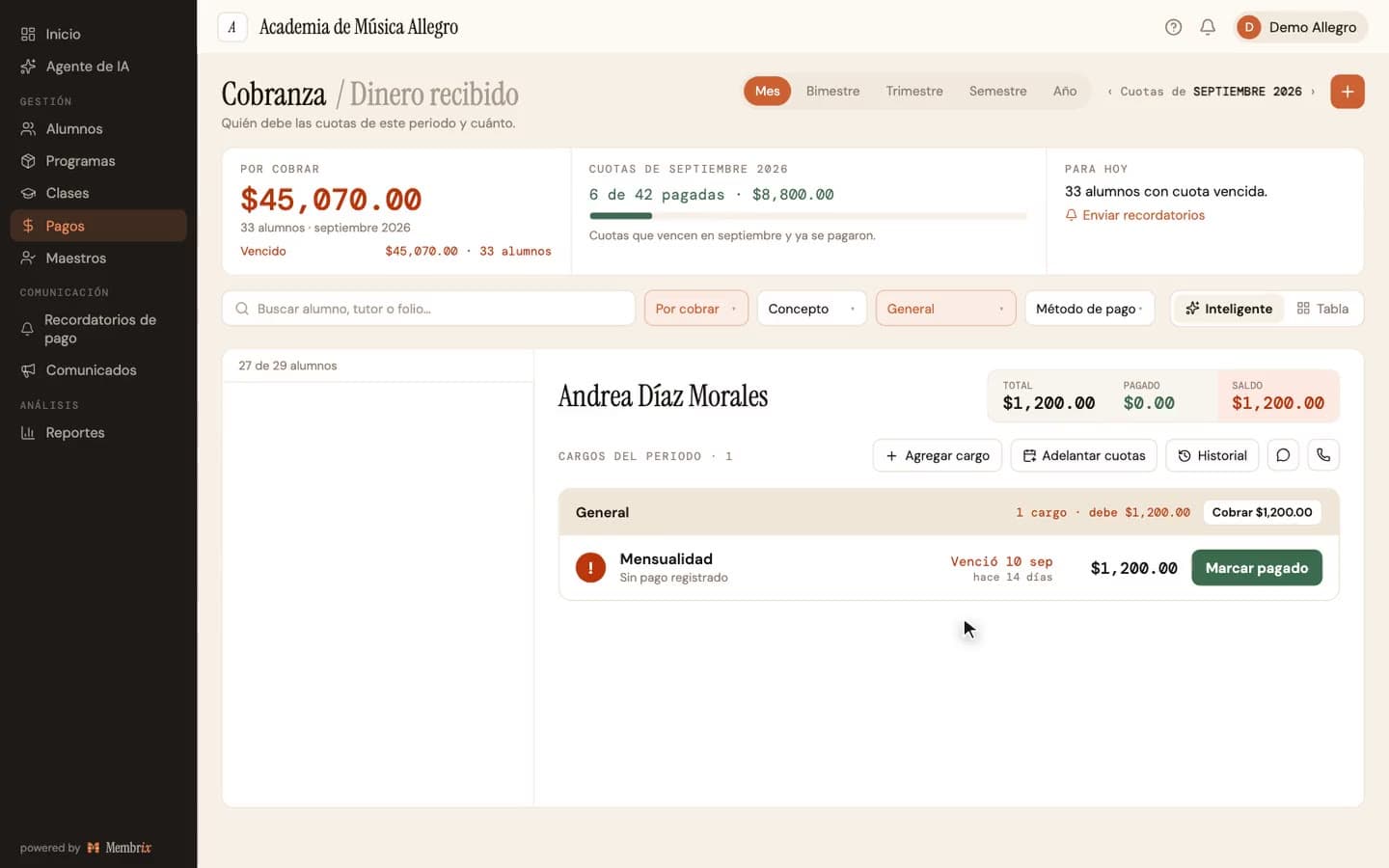
Tuition lives in four places, and none of them shows who owes
The money is real and arrives in different ways. What's missing is one place that says, this week, who is paid up, who paid half and who is late.
- Cash after class, bank transfers and card payments land in a pocket, a banking app and a card reader, and nobody adds them up per student.
- A student who pays half now and half next week looks either paid or unpaid in a spreadsheet, never “halfway.”
- A late fee gets added when someone remembers, or to some students and not to others, and that starts arguments.
- The uniform, the registration fee and the tournament get lumped into “tuition,” so the balance a student is quoted doesn't match what they owe.
How it works in Membrix, step by step
What you see here is what the product does today.
- 1
Choose US dollars as your currency
During sign-up you tell Membrix the currency you charge your own students in, and US dollars is one of the options. You can find it later under Settings, School (Configuración, Escuela). Membrix doesn't convert: it labels the amounts you enter, so choose dollars before you load prices.
- 2
Set a price and a billing day for each program
Each program has its own amount in dollars and its own billing model: monthly, a fixed-length course, a one-time charge or a class package. You choose the billing day, and Membrix generates the charges from it, with an optional registration fee billed once when a student enrolls.
- 3
Record each payment when it arrives
In Payments (Pagos), open a charge and register the payment: the amount, which can be less than the balance, the date, the method, a reference such as a transfer number and an optional note. When you save, you can send the student a receipt by email or app notification, in Spanish.
- 4
See who is pending, partial, paid or overdue
Every charge shows one of four states. A charge with part of its amount paid shows as partial, and one past its due date shows as overdue. Each student's account adds it up into a balance, so you can open a name and see what is owed.
- 5
Let late fees and discounts follow your rules
A program can add a late fee automatically after the grace days you set, as a percentage or a fixed amount. Discounts are set on each student's enrollment, and you can waive a specific late fee when you decide to.
- 6
Handle the exceptions without spreadsheets
“Add charge” (Agregar cargo) bills a uniform, a tournament or a workshop to only the students who owe it. One joint payment can cover several students at once, and “Advance payments” (Adelantar cuotas) lets a student pay ahead for charges that don't exist yet.
An example
A soccer academy with $120 monthly tuition (illustrative example)
On the 1st, Membrix creates a $120 charge for each player. On the 3rd, someone hands the coach $60 in cash for a player, which the front desk records with that day's date: the charge now shows as partial with $60 left. On the 12th the remaining $60 arrives by bank transfer, recorded with the transfer number as its reference, and the charge turns paid. A player who paid nothing by the grace day gets the late fee that the program was set to add, and shows as overdue.
What each plan includes
Tracking what is owed and recording payments is free. Sending reminders for you, reports and the cash-drawer count are Pro.
Free
$0
- Prices, charges, balances and overdue status, in dollars
- Recording payments with amount, date, method, reference and notes, including partial payments
- Automatic late fees per program, with grace days, and discounts on each enrollment
- Add charge, joint payments and advance payments
- A web portal where each student sees their account and payment history
Pro
$49/moper location, billed monthly
- Automatic payment reminders by app notification and email, as fixed Spanish templates
- Reports with Excel export for collection, income and overdue students
- Expense tracking and a profit-and-loss view
- The mobile app, where students can see their account
- A cash-drawer count with a cut at the end of each shift
Pro billed yearly: $41/mo per location ($499 a year). 7-day free trial.
What Membrix doesn't do here
So you don't find out after you sign up.
- Membrix doesn't process cards or bank payments in the U.S., and it doesn't charge anyone automatically. A student can't pay inside Membrix: you record the money you receive.
- The methods you can record are cash, bank transfer, debit card and credit card. There is no separate option for Zelle, Venmo or a check, so many academies record them as a transfer and write the app or the check number in the reference. Reports then group them under transfer.
- Currency is a label. Changing it after you have charges relabels the amounts and doesn't convert them, and one academy location charges in one currency.
- Receipts and reminders are written in Spanish. Reminders are a fixed template with a short note you can add, and there is no SMS channel.
- The cash-drawer count is a Pro feature, and its bill-and-coin breakdown exists only for Mexican pesos. You can still enter the total you counted, but you can't itemize it in dollars.
Frequently asked questions
Can I set my academy's prices and balances in US dollars?
+
Yes. Choose US dollars as the currency you charge your students in, and every price, charge and balance appears in dollars. Membrix doesn't convert between currencies. It labels the amounts you enter, so choose dollars before you load your prices.
Can students pay by card through Membrix in the U.S.?
+
No. Integrated card payments and automatic charges are currently available only in Mexico, in MXN. In the U.S. you collect tuition yourself, in cash, by transfer or with your own card reader, and record each payment so balances and overdue charges stay right.
How do partial payments work?
+
When you register a payment you type the amount, and it can be less than what is owed. The charge shows as partial and keeps the remaining balance, and you can register more payments against it later. When the balance reaches zero, the charge turns paid.
Which payment methods can I record?
+
Cash, bank transfer, debit card and credit card. Zelle, Venmo and checks have no option of their own, so choose the closest one, such as transfer, and write the details in the reference field. The reference and the note are free text that stays with the payment on the student's account.
Does Membrix send reminders to students who owe?
+
On Pro, yes. Automatic reminders go out by app notification and email in up to three steps around each due date, and the text is a fixed Spanish template with your short note. On the free plan you still see who is overdue and can message students yourself.
You might also like
More pages about Membrix:
Software for Spanish-language academies
What is in Spanish, what isn't and who benefits.
Tuition reminder templates
Eight copy-paste messages for late tuition.
Membrix vs Jackrabbit
Where integrated U.S. payments make a difference.
Membrix pricing
The free plan and Pro, in dollars.
Free academy management software
What the free plan includes.
Start tracking tuition in dollars this week
Create a free account, choose US dollars, add your programs and record your first payment. Unlimited students on the free plan.
Free plan with unlimited students. Pro is $49 a month per location, with a 7-day free trial.
Membrix's app and dashboard are currently available in Spanish.
Track tuition in USD. Integrated card payments and automatic charges are currently available only in Mexico, in MXN.